
Manheim
Manheim by Cox AutomotiveAuto & Vehicles
4.022.00 Reviews
- Version
- 1.15.1
- Installs
- 10.00K
- Age Rating
- Everyone
Screenshots

Our Review of Manheim
 Analysis by Appyee
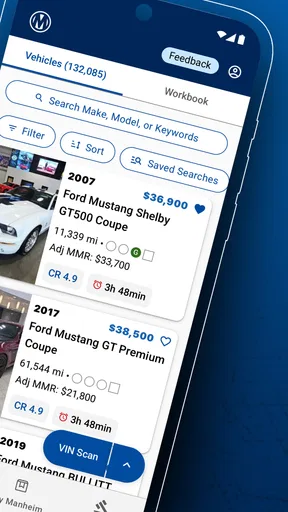
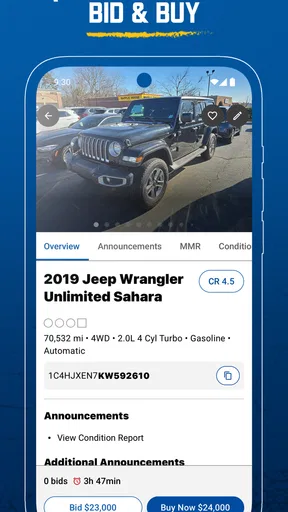
Buying vehicles remotely is rarely difficult because of one dramatic problem. More often, it is the small delays that cause trouble: a listing takes too long to inspect, a bid is hard to place while moving between appointments, or the information you need is scattered across several screens. Manheim is designed for that particular kind of work. It is a free Auto & Vehicles app from Manheim by Cox Automotive, built around browsing, bidding, and buying from a mobile device.
I approached it as a working tool rather than a casual shopping app. That distinction matters. This is not the kind of application I would open simply to browse cars for entertainment. Its value appears when I already have a buying goal, need to check vehicles away from a desk, or want a more direct way to stay involved in the auction process. The experience feels focused, and that focus is both its main strength and its main limitation.
How Manheim feels during real vehicle research
The first thing I noticed is that the app makes more sense when I use it with a clear plan. If I am looking for a particular type of vehicle, I can treat the phone as a portable research station: open the app, review available choices, compare the details that matter to my purchase, and decide whether a vehicle deserves further attention. That is more useful than endlessly scrolling without a budget, buying strategy, or inspection plan.
Its store summary promises the ability to browse, bid, and buy from anywhere, but my practical reading of that promise is more measured. A phone can keep me connected to the process, yet it does not replace the judgment involved in buying a vehicle. I still need to think about condition, transport, repair risk, total cost, and whether the vehicle fits the intended use. Manheim can shorten the distance between seeing an opportunity and acting on it; it cannot make a questionable purchase sensible.
The app is currently at version 1.15.1 and requires at least iOS or Android 12, depending on the device platform. That requirement places it within reach of many reasonably current phones, although anyone holding on to older hardware should check compatibility before planning to rely on it. The age rating is Everyone, which fits the straightforward business and vehicle-shopping purpose.
Speed expectations: useful when preparation matters
I would not judge this app by the same standard as a social feed or a simple calculator. Its perceived speed matters most at three points: opening a vehicle search, moving through listing information, and responding when I have made a buying decision. Those moments are connected to the quality of my preparation. If I already know what I want to investigate, the focused design feels more efficient than switching between a general browser, messages, notes, and separate auction pages.
The strongest speed advantage is not necessarily a dramatic animation or a flashy interface. It is the reduction in context switching. I can keep my vehicle-related activity in one place instead of searching the web, copying details into a note, and then trying to remember where a bidding action belongs. For a buyer who checks vehicles repeatedly during a busy day, that reduction can feel more important than a tiny difference in loading time.
There is a trade-off. A specialized auction app can feel less immediately familiar than a general marketplace. A casual user may need a moment to understand what deserves attention and which information should influence a bid. I recommend spending time learning the flow before a time-sensitive purchase. The safest workflow is to browse first, identify a shortlist, review each candidate carefully, and only then consider bidding. That turns speed into an advantage instead of an excuse to act too quickly.
My practical tip is to use the app for decisions that begin with a defined question. For example, I might ask whether a vehicle fits my target inventory, whether its expected resale margin is realistic, or whether its location and condition make the purchase worthwhile. This keeps the mobile experience purposeful. It also helps reveal whether Manheim is saving me time or merely giving me another place to browse.
Heavy-use moments: where a mobile workflow earns its place
The app becomes more valuable during periods when I am checking several vehicles or revisiting the same buying criteria throughout the day. A dealer or vehicle professional may need to monitor opportunities while away from a computer, while a private buyer could use it when researching a purchase with a clear understanding of auction buying. In both cases, the phone provides flexibility that a desktop-only process cannot match.
A realistic example would be a buyer who has a narrow budget and is comparing several possible vehicles before committing. In the morning, I could use Manheim to review candidates and note which ones deserve closer attention. Later, while away from my desk, I could return to those choices rather than starting the search again. If one becomes relevant to my plan, the ability to continue from the phone is more convenient than waiting until I return to a computer.
That convenience should not be confused with a complete inspection workflow. A mobile screen is useful for reviewing and acting, but it is not a substitute for seeing a vehicle in person or arranging an inspection when the purchase carries meaningful risk. The app helps me manage the transaction side of the decision. It does not remove the physical and financial responsibilities that come with buying a used vehicle.
One non-obvious advantage is the possibility of separating research from impulse. I can create a personal routine in which I first browse and compare, then step away, calculate the full purchase cost, and return only if the vehicle still makes sense. That pause is especially useful in an auction environment, where urgency can make a promising listing look better than it really is. The app supports quick action, but I get better results when I deliberately add a slower evaluation step.
Heavy use also exposes the limits of mobile attention. Looking at vehicles on a phone while handling other tasks can lead to missed details or rushed decisions. I would avoid treating the app as something to operate casually while driving, working with customers, or moving through a crowded location. The best use is short, focused sessions in which I can read carefully and confirm what I am doing.
Reliability and recovery after interruptions
For an app connected to vehicle buying, reliability means more than opening successfully. I want confidence that I can return to the same research process after a break, understand where I am, and avoid repeating unnecessary work. Manheim’s focused purpose works in its favor here because I am not navigating a collection of unrelated entertainment or shopping features. The app has a clear reason to exist, and that makes it easier to build a repeatable routine around it.
Still, I would not make a bid based on the assumption that a phone is infallible. Mobile connections change, batteries run low, notifications interrupt attention, and an app can be closed at the worst possible moment. My recommendation is to prepare before a time-sensitive action: keep the device charged, use a dependable connection, and confirm the vehicle and decision before proceeding. These are ordinary precautions, but they matter more when the result could affect a real purchase.
The most sensible recovery habit is to avoid relying on memory. If I am interrupted, I return to the vehicle and review the relevant information again rather than assuming I am still looking at the same item or stage of the process. That may sound slower, but it protects against the more expensive mistake of acting on an outdated assumption.
Another useful habit is to keep a separate record of my buying criteria and maximum acceptable cost. I do not need a complicated spreadsheet for every search; even a short note can help me distinguish a genuine opportunity from a vehicle that only looks attractive because it is available now. This is an important trade-off with any mobile auction tool: the app can make access easier, but personal discipline determines whether that access improves the decision.
The app has an average rating of 4.0 from around 53 ratings, with about 22 written reviews, and it has passed 10 thousand installs. Those numbers suggest a modest but real user base rather than the broad reach of a mainstream consumer marketplace. I read that as a reason to judge it by fit. It does not need to serve everyone to be useful for people who actually work with Manheim’s vehicle-buying process.
Device constraints and the right audience
The minimum operating-system requirement of 12 is the clearest device constraint. On a supported phone, I would expect the experience to depend more on the quality of the connection and the device’s general condition than on extraordinary hardware. On an older unsupported phone, however, compatibility becomes the first question. I would check that before relying on the app for a planned purchase or a busy workday.
Screen size is another practical consideration. A larger phone makes vehicle research more comfortable because listing information and comparisons are easier to read without constant zooming or scrolling. A compact phone may still be convenient for quick checks, but I would prefer a larger display for a longer session. This is not a reason to reject the app; it is a reason to match the device to the task.
Storage and resource demands are difficult to judge from the app’s basic store details alone, so I would not promise that it is exceptionally light or exceptionally demanding. My advice is simple: keep the operating system current enough for compatibility, close distractions during focused work, and avoid using a nearly full or poorly maintained device when timing matters. Those steps improve the overall mobile experience without pretending that hardware can solve every workflow issue.
Manheim is best suited to people who already have a legitimate reason to browse, bid, or buy through this vehicle-auction environment. It may appeal to dealers, professional buyers, and experienced vehicle shoppers who understand that auction purchases require research and financial discipline. It is less suitable for someone who wants a broad public marketplace with familiar consumer listings, casual seller communication, or a simple local classified-ad experience.
That comparison is important. A general marketplace may be better for a private seller listing one vehicle or for a buyer who wants to negotiate directly with an individual. A dealership website may be better when I want a retail buying process with conventional support and a more familiar showroom structure. Manheim makes more sense when the auction-oriented workflow itself is what I need. Choosing it simply because it is free would be the wrong reason.
Three practical insights that improve the experience
First, I would use a two-pass method. During the first pass, I browse broadly and remove vehicles that fail basic requirements such as intended use, budget, or location. During the second pass, I examine the smaller shortlist with a stricter eye. This prevents the phone’s convenience from turning every interesting listing into a bidding candidate.
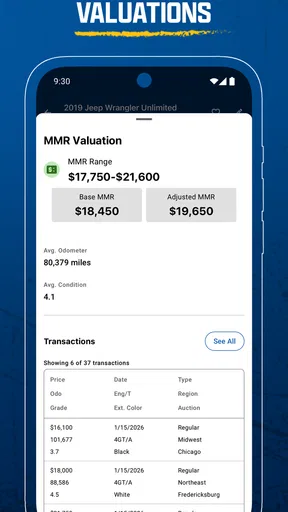
Second, I would calculate the purchase as a complete project rather than focusing on the vehicle alone. My mental checklist includes the likely transport burden, preparation work, repairs, registration-related costs, and the margin I need if the vehicle is intended for resale. The app can help me reach a buying opportunity, but the best decision often comes from costs outside the screen.
Third, I would create a personal cutoff before opening a time-sensitive listing. If I decide my maximum acceptable cost only after becoming emotionally invested, the mobile interface has already placed me at a disadvantage. Setting that boundary earlier makes the bidding process calmer and gives the app a clear role: it becomes a tool for executing a decision, not for making one under pressure.
A fourth insight is to treat repeated browsing as research, not progress. Returning to the app many times can feel productive, but it is only useful if each visit answers something new. I try to leave a session with a shortlist, a rejected option, a cost question, or a next step. That approach keeps the app from becoming an endless loop of vehicle checking.
Who should use it, and who should choose another route?
I would recommend Manheim to a reader who needs mobile access to vehicle-auction activity and is comfortable taking responsibility for research, timing, and purchase limits. The free price removes a barrier to trying it, and the Everyone rating makes it broadly accessible from an age-classification perspective. The real qualification is not age or technical confidence; it is whether the user understands the type of buying process involved.
I would be more cautious recommending it to a first-time buyer who expects the app to explain every risk or guide them through a retail-style purchase. Someone who has never assessed a used vehicle, estimated repair exposure, or planned transport may need a different starting point, such as an experienced adviser or a more consumer-oriented marketplace. Manheim can support an informed buyer, but it should not be treated as a replacement for that knowledge.
I would also skip it if my goal were simply to sell a personal car locally, compare ordinary dealership offers, or browse vehicles without any intention of using an auction workflow. In those cases, a general classified service or a dealer’s own app may be a better match. The strongest recommendation I can make is therefore conditional: Manheim is most useful when mobile access to its specific buying environment is the problem I am trying to solve.
Performance verdict: convenient access, not automatic peace of mind
After looking at speed, demanding use, reliability, and device fit together, I see Manheim as a practical companion for prepared vehicle buyers. Its performance value comes from keeping browsing, bidding, and buying within a mobile workflow, especially when I am away from a desk. The app is not valuable because it makes vehicle purchasing effortless; it is valuable because it makes an existing process easier to continue while I am mobile.
I appreciate that distinction because it sets realistic expectations. I would use it to maintain momentum, revisit a shortlist, and act when a well-researched opportunity meets my criteria. I would not use it as my only source of judgment, nor would I let its convenience push me into a purchase I had not budgeted properly.
Manheim by Cox Automotive is a focused Auto & Vehicles app with a current version of 1.15.1, and its four-point average gives it a reasonable reception among its relatively small user audience. It is free to install and aimed at Everyone, but its practical audience is narrower than those labels suggest. The people most likely to appreciate it are those who already understand why they need this particular vehicle-buying channel.
My final advice is to install it when you have a concrete buying task, test the browsing workflow before you need it urgently, and establish your inspection and spending rules outside the app. Used that way, Manheim can be a convenient mobile extension of serious vehicle research. If you are looking for a casual marketplace or a fully guided retail experience, I would choose another option instead.
Verdict
Strengths of Manheim
- Large selection of wholesale vehicles from trusted auction sources.
- Detailed listings help buyers compare mileage, condition, and vehicle history.
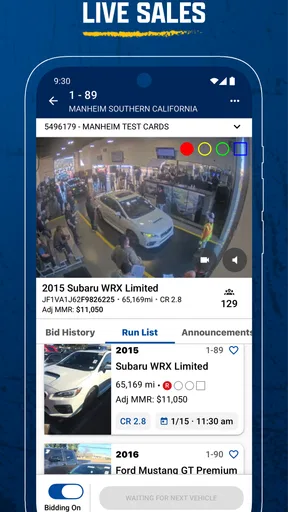
- Online bidding lets dealers participate without visiting an auction site.
- Useful inventory search filters save time when browsing available vehicles.
- Digital auction tools support faster purchasing and inventory management.
Limitations of Manheim
- Access is mainly designed for licensed dealers, not private car buyers.
- Some vehicle listings may have limited photos or condition details.
- Competitive bidding can quickly raise the final purchase price.
- Auction fees, transport, and other charges can increase total costs.
- The app may feel complex for users unfamiliar with wholesale auctions.
Similar Picks in This Category
View All
Android Auto
Google LLC4.1

maxim — order a taxi & food
PT. SITO4.7

Штрафы ГИБДД: проверка с фото
Pays LLC – Штрафы ГИБДД4.7

Номерограм – проверка авто
Авто Ассист4.8

Дром Авто
Дром4.9

Frequently Asked Questions
What is the Manheim app used for?
Manheim is a vehicle marketplace app designed primarily for automotive dealers and other qualified industry users. It allows users to browse available wholesale vehicles, review auction information, check vehicle details, follow listings, and participate in eligible buying or selling activities. The exact tools available can depend on your account type, location, and relationship with Manheim.
Can anyone use Manheim to buy vehicles?
Manheim is generally focused on the wholesale automotive market, so access is not the same as using a typical public car-shopping app. In many cases, users must be verified dealers, licensed automotive professionals, or approved business customers. Registration requirements may vary by country and auction, so you should confirm eligibility before downloading the app or expecting to bid on vehicles.
Can I bid on and purchase cars directly through the Manheim app?
The app may support browsing inventory, viewing auction information, placing bids, and managing transactions, but available features can vary according to your account permissions and the specific Manheim marketplace. Some vehicles or auctions may require additional approval, fees, or in-person procedures. Always review the listing terms, buyer requirements, payment rules, and auction conditions before bidding.
What vehicle information is available in the Manheim app?
Vehicle listings can include details such as make, model, year, mileage, condition information, photographs, auction location, sale date, and pricing or bidding data. However, the amount of information may differ between listings. Digital descriptions should not replace careful inspection, and users should review condition reports, title information, disclosures, and any available inspection options before completing a purchase.
Are there extra fees when using Manheim?
Purchasing through Manheim can involve more than the displayed vehicle price or winning bid. Depending on the transaction, users may encounter buyer fees, seller fees, transportation charges, storage costs, taxes, title expenses, and other auction-related charges. The exact total depends on the sale and location. Read the fee schedule and transaction terms carefully before confirming a bid or purchase.
